
Our server is Farkin charged: Fark is our custom-built Discord bot. Tracking games, ranking players, building squads, and firing alerts 24/7. Everything the server needs, automated and live. Check it out in our Discord server!
🎮 Steam Integration – Link your Steam profile for enhanced stats and matching
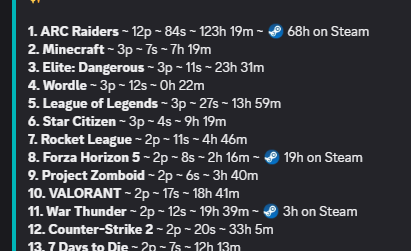
BattleLink connects your Steam profile to BattleHits for live game tracking, achievement unlocks, playtime stats, and leaderboards. All automatic.
Use /steam link to get started.
🎮 Who’s Playing – See who’s online and what they’re playing
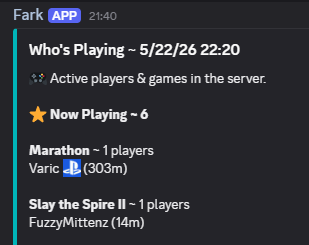
Updated every 10 minutes in #whos-playing so you can see who’s online and what they’re playing . Active sessions show how long someone’s been in. Recent plays show the last 24 hours. Platforms and Steam players are also shown.
👥 LFG – Automated group management. Find other players for coop or other mayhem
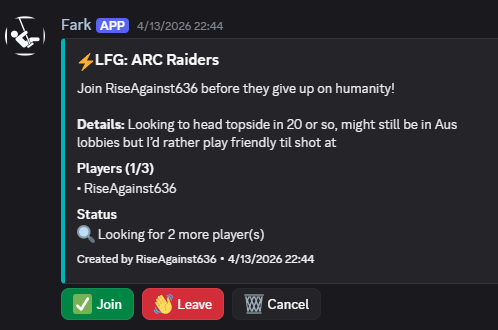
/lfg in #lfg. Set your game, set your squad size, write something in the description if you have preferences. When the group fills, Fark will create a voice channel and ping everyone.
🔎 Matchmaking – Match with other players. We connect gamers no matter what you play
Game & Player Lookup Two commands. Both useful. /gg game [title] pulls everything the server knows about a game including genre, release year, time-to-beat from IGDB, plus who played it first, total sessions, total playtime, and the top 10 players by hours logged. Cover art included. Start typing and it autocompletes from the server’s actual play history, not a generic database.
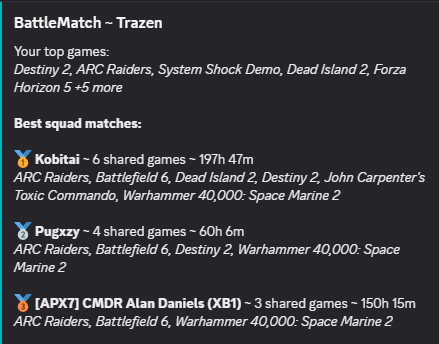
/gg match is the one worth running. It looks at your play history and platforms, then finds server members who’ve been in the same games and ranks them by overlap. Been playing the same three titles as someone for months without knowing it? Now you know.
🏆 Leaderboards – See top games and players in the server
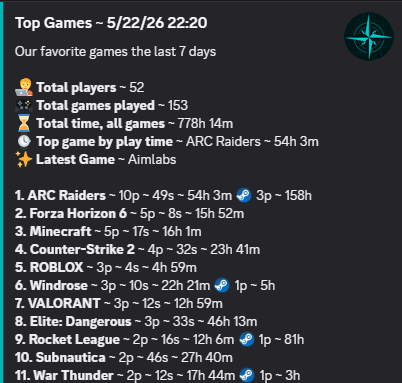
Leaderboards refreshed every 10 minutes in #leaderboards. Most Active players and Top Games by the server. All data rolls on a 7-day window. Steam players and stats for matching games.
🚨 Squad Alerts – See when a game is getting hot with a lot of players
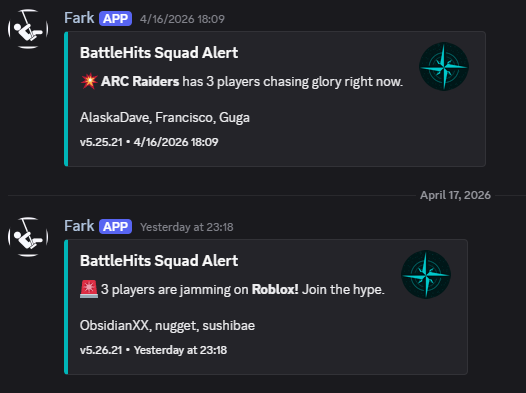
Three or more people on the same game at the same time and Fark will post in #squad-alerts. That’s it. That’s the feature. Go play with them.
⚡ Activity – See when things actually happen! New games, session records, popular games, Steam achievements
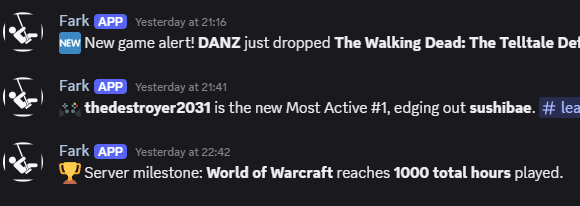
Fark will post when things actually happen. New game hits the server. Someone breaks their personal session record. A game jumps three spots on the charts overnight. Power ranking changes. Streak milestones. Server hits 1,000 collective hours in a game. It’s all in #activity. You could check it. Or not. He’ll post it either way.
🛠️ Patch Notes – We’ll keep you up to date on the latest updates and patches for popular games in the server
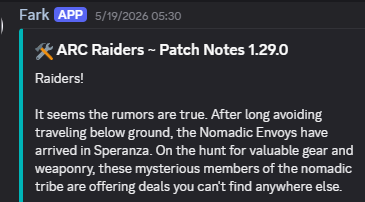
Every 6 hours Fark grabs patch and update news from Steam and posts in the #patch-notes channel. Sorted by most recent and pulled from a curated list of our most popular games!
📆 Server Events – Game nights, releases, and more
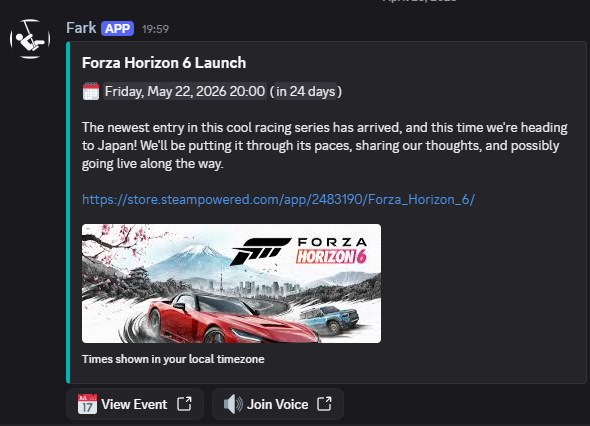
Discord scheduled events sync to https://battlehits.net/events. Fark will start the event, send announcements and join the voice channel if one is set. Events are automatically ended after 12 hours.
👑 Achievements & Infamy – Earn bragging rights for Discord and game activity
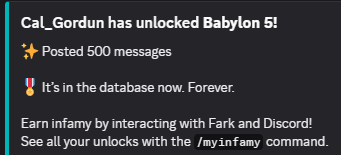
Infamy is BattleHits’ achievement system. Earn it by playing games, running commands, talking to Fark, reacting to things, posting in the server, and generally existing in ways Fark finds noteworthy. When you hit a milestone he’ll announce it to the server and log it permanently to your profile. Use /myinfamy to see what you’ve earned.
🍿 Stream Notifications – We’ll let everyone know when there is a new Twitch or Discord stream
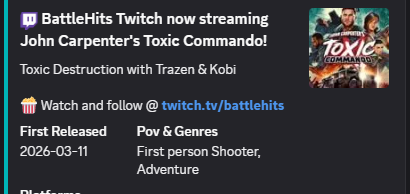
Fark will post when the official BattleHits Twitch or any streamers he follows goes live. He’ll also let us know when someone is streaming in Discord too!
💬 Talk to Fark – Talk to our infamous bot. He might surprise you, definitely mock your gaming skills.
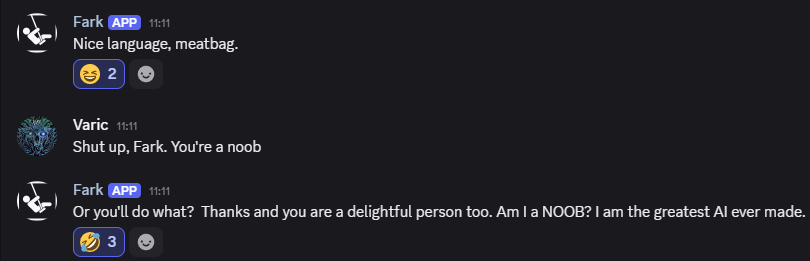
Members can interact with Fark directly by including “Fark” in any message. Most slash commands are available in all channels.
⌨️ Commands
| Command | What It Does |
|---|---|
/gg [match / game] | /gg game [title] pulls everything the server knows about a game /gg match looks at your play history & finds server members who’ve played the same games |
/topgames | Shows the server’s top games by unique players and sessions, last 7 days. |
/peaktime | Shows server highlights the last 7 days |
/igdb [title] | Searches the Internet Games Database for game info: developer, platforms, genres, release date, time-to-beat. |
/myinfamy | Show your BattleHits infamy |
/releases [pc / ps5 / xbox] | Lists upcoming game releases for that platform, sourced from IGDB. |
/myalerts add [game] | Adds a game to your personal sale watchlist. You’ll get a DM when it goes on sale. |
/myalerts del [game] | Removes a game from your sale watchlist. |
/myalerts list | Shows all your active sale alerts. |
/dice [num] [sides] | Roll dice in the #dice channel. Beat the high score. |
/sage | Starts a new round in the #gamesage channel. |
/steam [status] [link] [unlink] | Manage your BattleLink Steam integration. |
/locate [cmdr] | Locate a player in Elite Dangerous. |
/distance [system 1 system 2] | Get the distance between two systems in Elite Dangerous |
/weather [city country] | Get weather for a city/country, because that may be the only way you get a sense of what’s outside. |